

MIRADAS
by Bea
Tutorial translated with the permissiona of the author
Original aqui
 |
| http://rincondebea.altervista.org/ |

LenK's:Zitah
TUBE:
Cibi-bijoux
Narah mask
PREPARATION:
*Open the files into PSP and duplicate(shift+D) and close the originals
*Save the selections in the PSP selections folder
*You can change the Blend Mode of the colors according to use
*If you find any errors in the tutorial,please, let me know: e-mail
SCRIPT
1. Open a new image with:850x600px
1. Open a new image with:850x600px
Fill with the gradient formed with the colors:#3d3c18 e #d5bd87

2. Plugin L en K's - Zitah

3. Layers - duplicate
4. Layers - New Mask layer - From Image - mask: Narah_Mask-0282

Merge Group
5. Drop shadow: 2/2/100/2 - cor #1e1d02
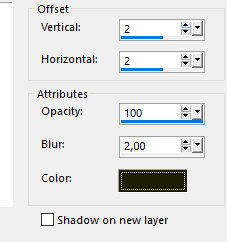
Repeat the Drop Shadow com V e H negativos
Blend Mode: overlay
6. New Raster Layer
Selections - Load selection from disk - Selection Narah_sel_Mony
7. Fill with the same gradient, but , with marked invert
8. Copy and Paste into selection the paysage fondo_tubeMane
9. Effects - Edge Effects - Enhance
10. Drop shadow

11. New Raster Layer
Selections - Modify - Select selection borders: Inside/10
Fill with the color #361004
Select None
12. Effects - Distortion Effects - Ripple


13. Drop shadow - cor#800000

14. New Raster Layer
Selections - Load selection from disk - Selection Narah_sel_inblack2
Fill with the color #361004
15. Drop shadow

Select None
16. With the Pick Tool, take the image until equal to the edges as print


17. Effects - Edge Effects - Enhance
Effects - image Effects - offset: Horizontal: -32 Vertical: 0
18. Copy and paste as new layer the tube Beauty_African_Portrait_Cibi_Bijoux
Image - Mirror
Position as desired
Layers - Arrange - Move down
19. Image - Add borders - 25px - cor #361004
20. Select the border with Magic Wand
Effects - Art Media Effects - Brush Strokes

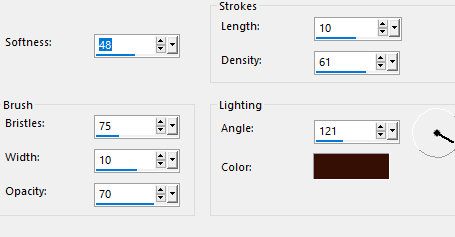
21. Effects - user Defined Filter - Emboss 3
Select None
22. Image - Resize: 800x600px
Merge all
Add your signature


